Claim a contact identifier
Note: You can claim phone, email, and social channel identifiers (Apple Messages for Business, X (Twitter), Facebook, Instagram, and WhatsApp).
- Click Directory > External Contacts.
- Click Menu > Contacts > External Contacts and Organizations.
- Type all or part of the contact’s name or organization in the Search External Contacts and Organizations box.
- In the result list, click the row of the contact that you want to view.
- In the Contact Summary panel, click the star
 icon next to the identifier that you want to claim. In the Claim Identifier dialog, click Claim to link the identifier to the current contact.
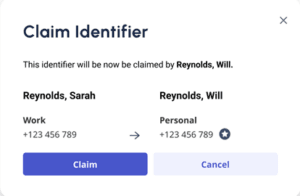 Claim identifier dialog when claiming a previously claimed identifier" class="alignnone wp-image-347254 size-medium" style="border: 1px solid gray;" srcset="https://rctestbranch.wpengine.com/wp-content/uploads/2024/07/claim-assigned-identifier-300x196.png 300w, https://rctestbranch.wpengine.com/wp-content/uploads/2024/07/claim-assigned-identifier.png 414w" sizes="auto, (max-width: 300px) 100vw, 300px">
Notes:
- If that identifier is already claimed by a different contact, click Claim to reassign the identifier to the current contact.
- When an identifier is claimed, a star
 icon appears next to the claimed identifier.
[NEXT] Was this article helpful?
Get user feedback about articles.